Windows game optimizer · v1.0.2

Tune. Play. Perform.

OptiCore tunes Windows for gaming and shows you every change before it's made. Every change is backed up and can be restored in one click. No fake FPS promises.

Download for Windows Get a license key Free for 24 hours, no key or card needed · Windows 10 / 11 · 64-bit · NVIDIA, AMD & Intel GPUs · 0.96 MB
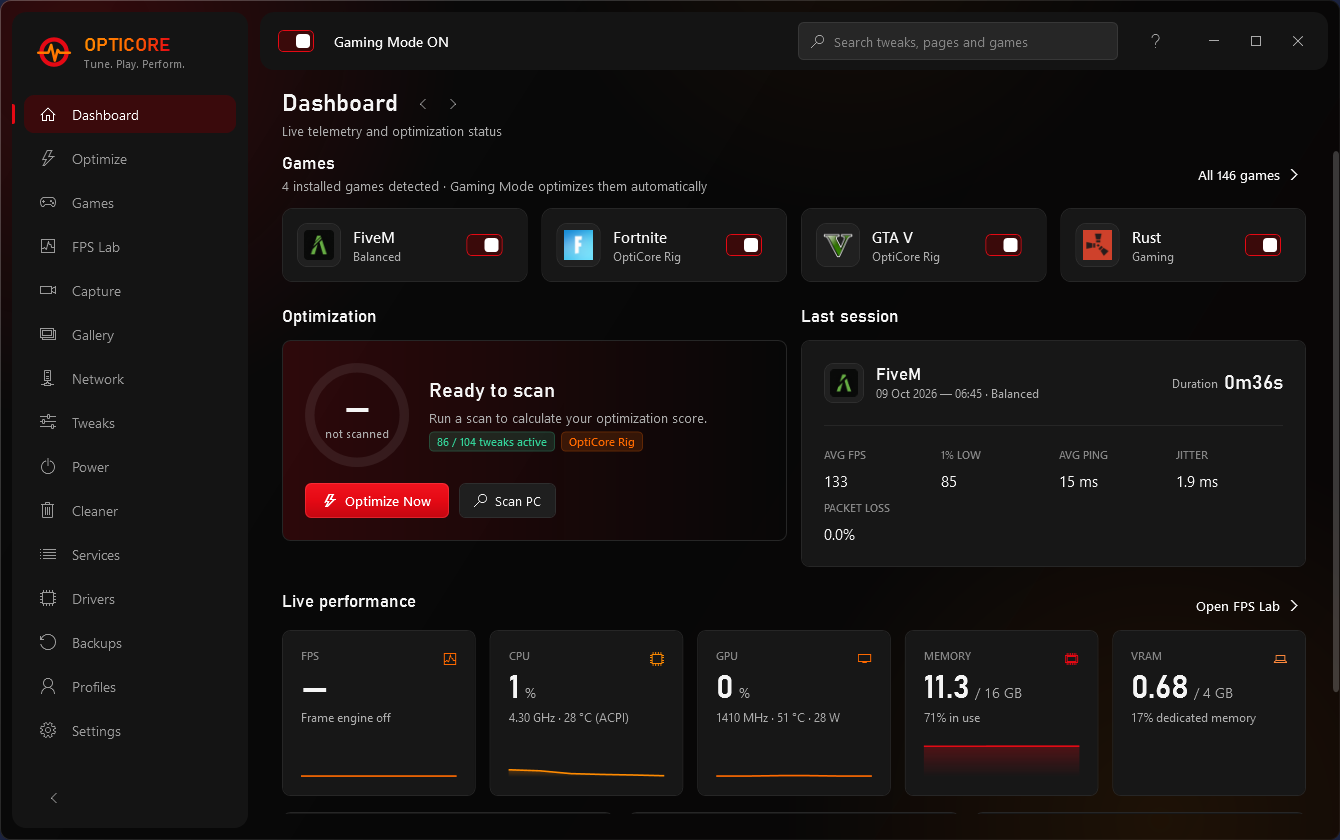
OptiCore dashboard showing detected games, optimization score and live CPU, GPU and memory stats
116reversible tweaks
140+games recognised
0game files touched
24 hfree trial, no key needed
Features

Everything a gaming PC needs, nothing it doesn't

Built for real setups like a mid-range CPU, a 4 GB GPU and a long FiveM session, not benchmark screenshots.

Auto Gaming Mode

Start a game and OptiCore applies that game's profile. Quit and it puts everything back. Works with FiveM, GTA V, Fortnite, Minecraft and more.

One-scan optimize

Checks Windows, CPU, GPU, RAM, storage, network and drivers, then lists the exact registry and power changes before you apply anything.

FPS Lab

Built-in frame capture using the same technique as Intel PresentMon. Compare average FPS and 1% / 0.1% lows before and after a change. Nothing is injected into the game.

Network & Route Lab

Ping, jitter, DNS benchmark and adapter tuning. Paste a cfx.re join code to see the FiveM server's name, location and your ping to it.

Power plan builder

Build your own power plan from presets, clean out duplicate plans, and keep cores and USB awake while you play.

Restore Center

Every value is recorded before it changes and checked after. Undo one tweak, a whole profile, or everything, at any time.

In-game overlay & Alt + X panel

FPS, 1% lows, CPU/GPU load, temperatures, VRAM and ping on top of your game, plus a hexagon panel for clips, replay, screenshots and Gaming Mode.

Instant replay & recording

Alt + F10 saves the last 15 s to 30 min, Alt + F8 records, Alt + F11 screenshots. GPU encoding on NVIDIA, AMD and Intel, with game audio and your mic.

Gallery & player

Every clip by game and date, including your NVIDIA clips, with a built-in player, instant trimming and one-click share links via Google Drive.

Game graphics presets

Low / Mid / High for FiveM, GTA V, Fortnite, Rust, CS2 and Minecraft, written straight into each game's settings file. Import your own presets too.

FiveM console, binds & crosshair

FOV, aim acceleration, reticle, brightness and FPS unlock without typing in F8. Press-a-key bind manager and a crosshair builder with live preview.

Featherweight

In the tray OptiCore idles at about 25 MB of RAM and 0% CPU. While you play it lowers its own priority so it never competes with your game.
Screenshots

See it before you download

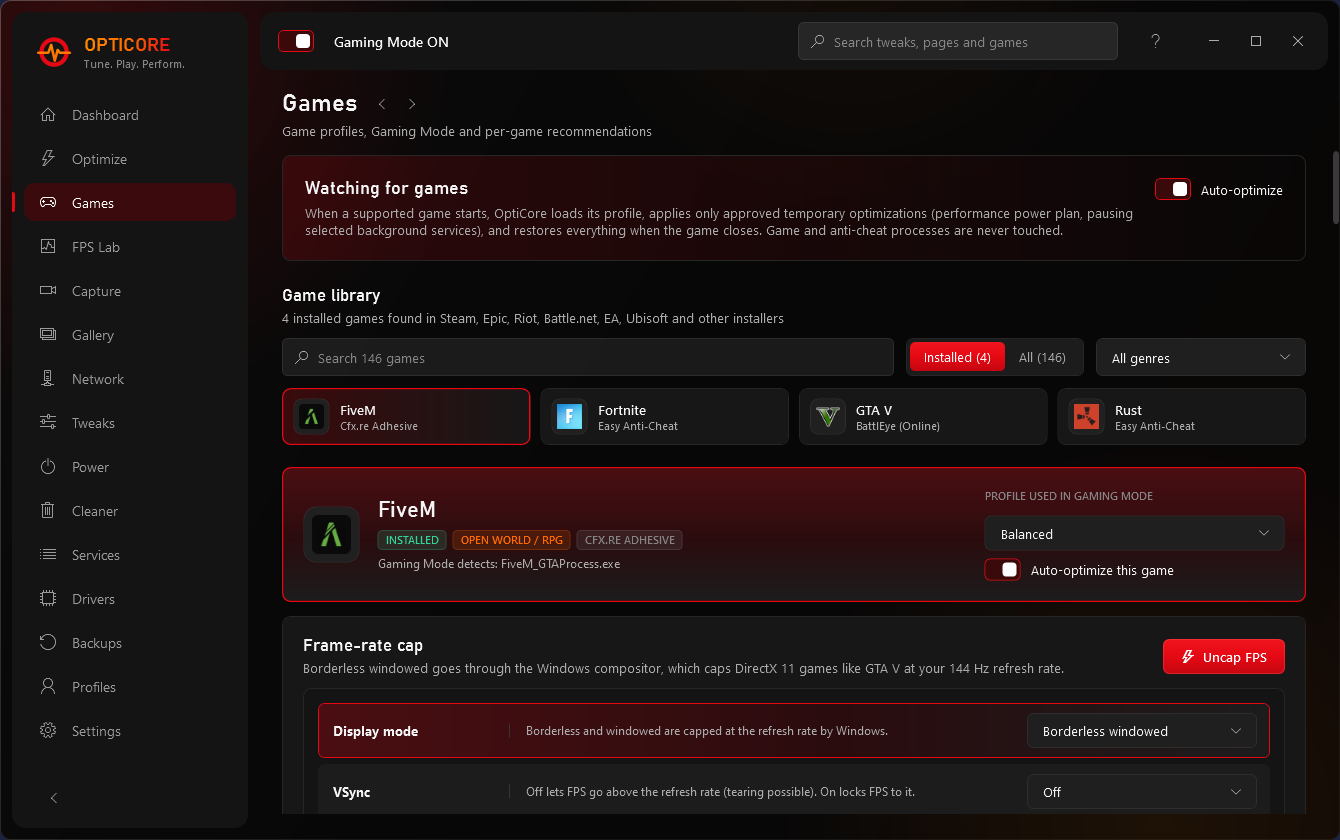
OptiCore screenshot

Games: per-game profiles, anti-cheat info and the FiveM / GTA V frame-rate cap control.

Safety first

Honest by design

Most "FPS boosters" run scripts you can't read and can't undo. OptiCore shows every change and rates its risk, and it refuses to touch anything that could hurt your PC or your game account.

OptiCore will never…

  • Touch game files, inject into game memory or interfere with anti-cheat
  • Turn off Windows Defender, UAC, Windows Update or security mitigations
  • Apply placebo "registry boosts" that do nothing
  • Promise FPS numbers it can't measure. The FPS Lab shows you the real difference.
  • Change anything without a backup you can restore
SAFE

Standard Windows settings with a clear benefit and no downside for gaming PCs. Optimize applies these.

CAUTION

Depends on your setup, e.g. higher idle power or a feature you might use. Only applied when you choose it.

BLOCKED

Never applied. Listed with the reason, so you know why that "tweak" from a random script is a bad idea.

Games

Knows your games

OptiCore finds games from Steam, Epic, Riot, Battle.net, EA, Ubisoft and other installers, and knows each one's anti-cheat, so it stays out of the way.

FiveM · Safe ModeGTA VFortniteMinecraft ValorantCounter-Strike 2Apex LegendsCall of DutyRust League of LegendsRocket LeagueOverwatch 2Rainbow Six Siege PUBGEscape from TarkovRobloxDota 2Warzone + 122 more
Pricing

Free forever. Pro when you want more.

Try every Pro feature free for 24 hours, no key or card needed. After that OptiCore keeps working as Free.

Free

$0

forever

  • PC scan & optimization score
  • 10 starter tweaks
  • FPS Lab benchmarks
  • Network test & DNS benchmark
  • Recording (no limit) & 5-min replays
  • Stats overlay & screenshots
  • Cleaner & Restore Center
Download
MOST POPULAR

Pro · Lifetime

$12.99 / ₹999

one payment, this PC, all updates

  • Everything in Free
  • All 116 tweaks & full Optimize Now
  • Auto Gaming Mode per game
  • 30-min instant replays
  • Drive upload for replays
  • Game presets, FiveM console & crosshair
  • FPS uncap, cfx ping, Route Lab, power builder
Get Pro

Pro · Monthly

$2.99 / ₹149

per month, cancel any time

  • Everything in Pro
  • Pay as you go
  • Switch to Lifetime later
Get monthly

7-day refund if OptiCore doesn't work on your PC · see the refund policy. Keys are delivered on Discord.

Download

OptiCore 1.0.2

A single portable .exe of 0.96 MB. Try it free for 24 hours, then get a key on Discord to unlock everything.

Version
1.0.2 · released 9 Oct 2026
Size
0.96 MB
SHA-256
0907473e2b7208dab81cc4344acaa317318e6762a4cdbb68c4e225abf54e7c28

Get started in a minute

Download and run OptiCore.exeIf Windows shows "Windows protected your PC", click More info → Run anyway. That happens to new apps that aren't code-signed yet.
Click "Install"OptiCore adds itself to the Start menu, Windows search and your desktop, and updates itself from then on. Uninstall any time from Windows Settings → Apps.
Click "Start free trial"Every Pro feature unlocked for 24 hours. No key, no card, no sign-up. After that, OptiCore keeps working as Free.
Like it? Get a license keyUnlocks all 116 tweaks, the FPS uncap and every profile. Join the Discord, get your key (OC-XXXXX-…) by DM and paste it in.
Works with NVIDIA, AMD and Intel graphics. Requires Windows 10 (1903+) or Windows 11, 64-bit, and administrator rights (to change system settings). .NET Framework 4.8 is already part of Windows.
FAQ

Questions

Will OptiCore increase my FPS?

Sometimes, but we won't promise a number. Most gains are steadier frame times and 1% lows, lower input latency and fewer background spikes, not a higher average. That's why OptiCore has an FPS Lab: measure before and after, and keep only what helps on your PC.

Can I get banned for using it?

OptiCore only changes Windows settings, the same ones you could change yourself in Settings or the registry. It never touches game files, game memory or anti-cheat processes, and FiveM Safe Mode stays clear of FiveM entirely.

Can I undo everything?

Yes. Each value is saved before it changes. The Backups page restores one tweak, a profile, or every change OptiCore ever made, in one click. OptiCore can also create a Windows restore point before big batches.

Why does Windows SmartScreen warn me?

SmartScreen warns about new programs that don't have a paid code-signing certificate yet. Click More info → Run anyway. You can check the download is the real file by comparing its SHA-256 hash with the one shown above (Get-FileHash OptiCore.exe in PowerShell).

How does the license work?

Every PC gets one free 24-hour trial with Gaming Mode, FPS Lab, the network tools and 10 starter tweaks. A key from the Discord unlocks everything, and if you don't continue, OptiCore can still undo every change it made. Your key is activated online once and locked to your PC. After that, OptiCore checks in quietly when it starts and works offline for up to 7 days at a time. Changing PC? Ask on the Discord and your key gets moved.

Does it need administrator rights?

Yes. Power plans, services and system registry settings can only be changed as administrator. Windows asks once when OptiCore starts.